CubeSmart Self Storage
- 3.3
- Rating
- 100.00K
- Installs
- Free
- Price

 Analysis by App-foxy
I approached CubeSmart Self Storage as the kind of business app you open when a storage account needs attention, not as an app you browse for entertainment. Its purpose is focused: it gives CubeSmart customers a mobile place to manage their storage space instead of relying entirely on a browser, a phone call, or a visit to the facility. That narrow purpose is also its main strength. When the task is connected to a CubeSmart unit, a simple account tool can be more useful than a feature-packed general finance or organization app.
My overall impression is practical rather than enthusiastic. The app is free, aimed at everyone, and developed by CubeSmart, L.P. It has passed the early-adoption stage with more than one hundred thousand installs, while its average rating sits at 3.3 from roughly one thousand ratings and several hundred written reviews. That combination tells me to set realistic expectations: many people find it useful for the basics, but the experience is not universally smooth.
How the app fits into a real storage routine
The best way to understand this app is to imagine a normal storage day. You are moving boxes into a unit, notice that you need to check something on the account, and would rather not search through old emails or wait until you are near a computer. A dedicated CubeSmart app puts that account relationship in a more direct place. I would use it before leaving home, while planning a visit, and immediately after moving items in or out.
You May Also Like

 Blood Strike: 2.5 Anniversary
Blood Strike’s Loadouts Turn Every Drop Into a Tactical Gamble
A close look at Blood Strike’s custom loadouts: how fast access to signature weapons reshapes its battle royale rhythm, rewards preparation, and narrows the gap between fights.

 Pandora - Music & Podcasts
Pandora’s Music Is Easy to Start, but Harder to Recover
Pandora’s strength is its low-effort path from a seed to a station. Its weak spot is how much confidence it asks you to place in connection, setup, and quiet recovery.

 8 Ball Pool
8 Ball Pool Is Built on Rivalries, Rematches, and Routine
A close look at the rivalries, rematches, shared routines, and unanswered safety questions that turn a quick pool match into a persistent mobile community.

 Samsung Music
Samsung Music’s Quiet Strength Is Playing What You Already Own
Its reach comes less from spectacle than from dependable access to a personal library. That simplicity is both the app’s strongest retention engine and its ceiling.

 AccuWeather: Weather Radar
AccuWeather Review: A Quick, Clear Forecast for Everyday Decisions
For everyday plans, the best forecast is the one you can understand quickly. AccuWeather makes rain timing, radar, and local conditions easy to act on, with a few trade-offs.

 Hill Climb Racing
Why Hill Climb Racing Still Turns Crashes Into One More Run
A tiny car, a bumpy hill and one more upgrade: Hill Climb Racing keeps resurfacing because its simple chaos makes every near-miss feel personal.
More From Our News Desk



That does not make it a replacement for every part of the storage experience. The app cannot turn a storage unit into a fully digital service, and it is not a general inventory manager for boxes, furniture, or documents. Its value depends on whether you already use CubeSmart and want a convenient mobile route to your storage account. If you are comparing facilities, tracking household contents, or coordinating a move across several companies, another tool will still be needed.
I also like the fact that the app is placed in the business category rather than presented as a lifestyle product. That sounds minor, but it sets the right expectation. You install it to complete practical account tasks. The interface should be judged by whether it reduces friction at the moment you need information, not by whether it offers an entertaining or highly customizable experience.
What feels useful for existing customers
For a current CubeSmart renter, the strongest use case is reducing dependence on scattered channels. Storage customers often keep account details in email, payment reminders in a calendar, and facility information in a separate note. A dedicated mobile account can bring the storage relationship closer to the place where many people already handle everyday tasks: their phone.
There is a useful distinction between convenience and control here. The app may make it easier to reach your account, but it does not remove the need to read notices carefully or keep your own records. I would still save important confirmations and check the account after completing a significant action. That habit matters because storage arrangements can involve access planning, billing awareness, and moving schedules, all of which are easy to overlook when an app is treated as a quick shortcut.
A practical workflow is to open the app before a planned visit, review the account information you expect to need, and make sure your phone is ready before arriving at the facility. After the visit, I would check again if I had made an account change or handled a time-sensitive task. This two-check routine is more reliable than opening the app only when something has already gone wrong.
What the current version tells me
The current version is 3.2.7, and the app was released on August 29, 2020. Those details place it in the category of an established service companion rather than a brand-new experiment. I see that as positive in one sense: a storage app has had time to settle into its basic role. At the same time, an established version number does not automatically mean that every screen or account workflow will feel polished on every phone.
The most sensible expectation is incremental improvement rather than a dramatic reinvention. A mature account app usually benefits from small refinements: clearer status messages, fewer unnecessary steps, better handling of interrupted sessions, and more dependable recovery when a user returns after time away. I would pay attention to those practical changes before judging the app by visual redesign alone.
The minimum operating-system requirement is Android 7.0, which makes the app accessible to people using older Android hardware as well as newer devices. That broad compatibility is helpful for a business tool, especially because users may keep an older phone for travel, moving days, or facility visits. Still, compatibility is not the same as identical performance. A newer phone may handle loading and navigation more comfortably, while an older device can make any account workflow feel slower.
It is important to separate what is visible now from what I would like to see next. The version number confirms that the app is being maintained as a product, but it does not promise a particular future feature. I would not install it expecting a full household inventory system, advanced move planning, or a universal storage dashboard. Those would be useful additions, but they belong to expectations, not established capabilities.
How updates affect people who already use it
For an existing customer, an update to a storage app is valuable when it protects routine rather than forcing users to relearn everything. I prefer changes that make account access clearer and reduce uncertainty around completed actions. If a screen looks different after an update, the important question is whether the new layout helps me confirm what happened.
My advice is to treat updates as a reason to review the app calmly, not during the most rushed part of moving day. Open it at home, sign in if necessary, and check where the information you use most often now appears. That small preparation can prevent a frustrating search when you are carrying boxes or standing outside a facility.
I would also avoid assuming that an update replaces personal safeguards. Keep your account contact details current, retain important confirmations, and use the app as one part of your storage routine. A mobile tool is convenient precisely because it is close at hand, but that convenience can encourage people to tap through a task without checking the final result.
The rating of 3.3 suggests a mixed experience, so I would not describe the app as universally dependable without qualification. Some users may encounter account-specific issues, confusing transitions, or situations where the app does not answer the question they have. A fair review has to acknowledge that a storage app is judged at stressful moments, and even a small interruption feels significant when someone is moving or trying to manage a deadline.
Where it fits beside the usual alternatives
The obvious alternative is using CubeSmart through a mobile browser or contacting the facility directly. A browser can be preferable if you do not want another app installed, if you are using a shared device, or if the app is not behaving properly. It also gives you a fallback when the mobile experience does not match what you need.
Calling the facility remains the better choice for questions that require human context. If your situation involves a special arrangement, a confusing account issue, or something that cannot be resolved through a standard screen, a conversation may save time. The app is best for routine self-service, not for replacing staff when the situation is unusual.
General payment apps and note-taking tools have their own roles, but they do not provide the same direct connection to a CubeSmart storage account. A budgeting app can help you remember a recurring expense, and a notes app can track what is inside a unit, yet neither is a substitute for a company-specific account tool. My preferred setup would be to use CubeSmart for account management and a separate simple inventory system for box labels, photographs, and contents.
That separation is a useful trade-off. Keeping inventory outside the storage app gives you more flexibility if you later change facilities or need to share the list with family members. The downside is that you must maintain two places. If your only goal is to handle the CubeSmart account from your phone, that extra system may be unnecessary; if you are storing a household's worth of belongings, it can prevent a lot of searching later.
Small workflows that make the app more worthwhile
One non-obvious benefit of a dedicated account app is that it can become a checkpoint in a larger routine. Before a move, I would use it alongside a short checklist: confirm the account, prepare the items going into storage, label boxes, and record where fragile or seasonal belongings are placed. The app handles the company-facing part, while the checklist handles the physical reality the app cannot see.
Another useful habit is to separate “I opened the app” from “I completed the task.” After any important action, look for a clear confirmation or a changed account state before closing it. This is especially sensible when the phone connection is weak or when you are multitasking during a move. The extra moment is less inconvenient than discovering later that you assumed something had gone through.
A third tip is to use the app before you urgently need it. Sign in at a quiet moment, become familiar with the main account area, and make sure you know how to return to it. That is not exciting, but it is exactly the kind of preparation that makes a narrowly focused business app useful. You do not want your first real test of it to happen while unloading a vehicle.
For families, I would be more cautious about shared access. The app is tied to a personal business relationship, so I would not casually pass a signed-in phone around. If more than one person helps manage the unit, agree on who handles account actions and keep the inventory notes separate. This reduces the chance of one person changing something while another assumes the account is untouched.
Who should use it and who should skip it
I would recommend trying it if you rent from CubeSmart, prefer self-service, and regularly manage storage from an Android phone. It is also a reasonable choice for someone who wants one company-specific place to start rather than searching through messages every time a storage question comes up. Because the app is free, the main cost is your time if it does not fit your routine.
I would skip it if you do not have a CubeSmart storage relationship. There is little reason to install a company-specific business app simply to explore it. I would also skip relying on it as your only moving organizer. It is not the right tool for cataloging every box, assigning tasks to several people, or combining accounts from different storage providers.
People who dislike installing dedicated apps may be happier with the mobile website or direct contact with the facility. Likewise, users on a very old or heavily loaded phone should judge the experience on their actual device rather than assuming that the minimum system requirement guarantees a smooth feel. The broad Android support is convenient, but individual performance can still vary.
What I would watch in future development
When I look at the app's next stage, I would watch for improvements that make routine account management more transparent. Clearer feedback after an action, better recovery from interrupted sessions, and straightforward navigation would matter more to me than decorative changes. For this kind of product, confidence is a feature.
I would also watch whether the app continues to serve both occasional renters and people who manage storage over a long period. A first-time user needs immediate orientation, while a long-term customer needs fast access without repeated explanation. Balancing those needs is difficult, and the best updates would make the app feel simple without hiding useful account context.
Another area worth watching is how well the app complements, rather than tries to replace, the physical storage experience. A helpful future direction could be better support around planning and account history, but I would not want extra features to bury the basic tasks. The app should remain quick to understand when the user is busy, carrying items, or dealing with a time-sensitive move.
Because the current rating is mixed, future releases will need to earn trust through consistency. Users are more likely to forgive a limited feature set than an unclear or unreliable account action. If later changes make the essential workflow easier to verify, that would be a meaningful improvement even without a long list of new tools.
My final take for a CubeSmart customer
I see this as a focused companion for people who already use CubeSmart, not as a complete storage-management platform. Its free availability, Everyone age rating, established release history, and support for Android 7.0 or later make it approachable for a broad range of customers. The real question is whether its account access is more convenient for you than the browser or a phone call.
My recommendation is to try it with modest expectations and a backup habit. Use it for routine account checks, prepare it before a moving day, confirm important actions, and keep your own inventory or payment reminders where they are easiest to manage. If the app handles your normal needs cleanly, it can remove a surprising amount of small friction. If you need detailed inventory control, multi-provider organization, or help with an unusual account situation, pair it with another tool or contact CubeSmart directly.
In my experience, the app is most valuable when convenience is the goal, not when you expect it to manage the entire storage process. That makes it a sensible download for an existing CubeSmart renter, while leaving room for a browser, a checklist, and human support when the situation goes beyond ordinary account management.
FAQs for CubeSmart Self Storage
01What is CubeSmart Self Storage, and what can I do with the app?
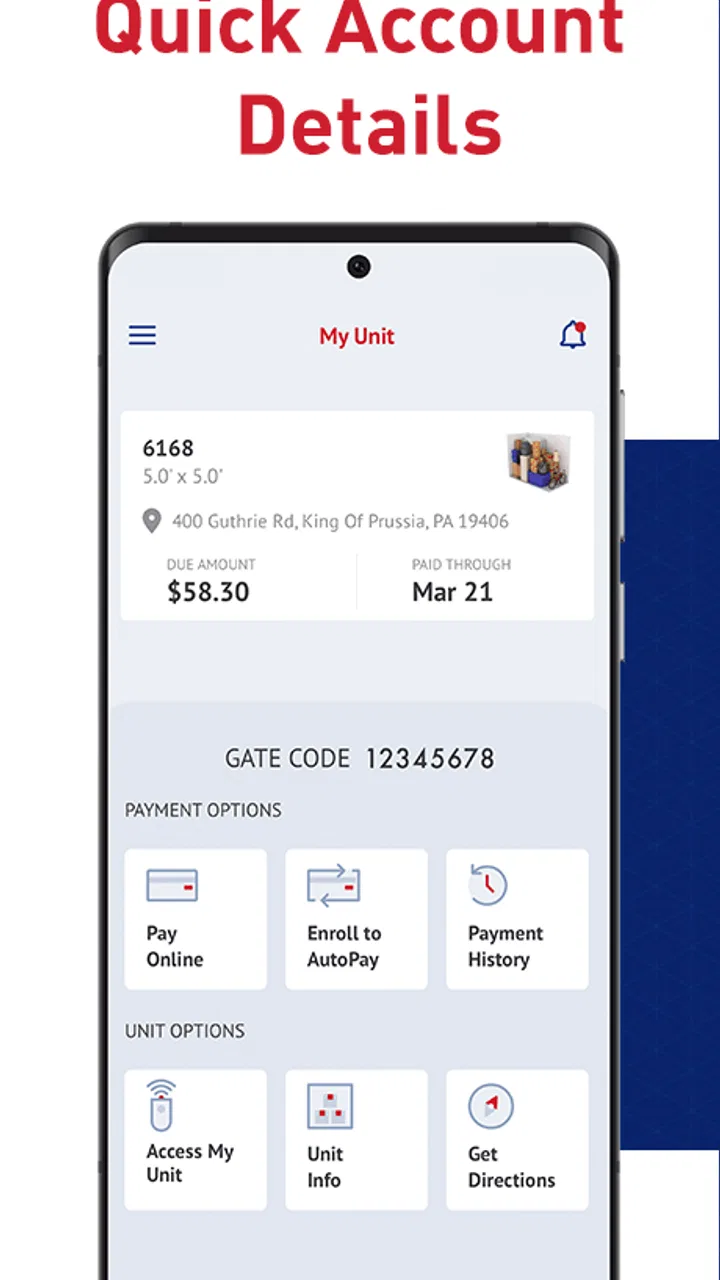
CubeSmart Self Storage is the mobile companion for managing a CubeSmart storage account. After signing in, users can typically review account information, check unit details, make or schedule payments, view balances, and find facility-related information. Depending on the location and account setup, the app may also provide access instructions or other storage-management tools. Available features can vary by facility and region.
02Can I rent a storage unit through the CubeSmart Self Storage app?
The app may help you find a nearby CubeSmart facility and begin the rental process, but the exact steps depend on the location and current availability. Some users may be directed to the CubeSmart website or asked to contact the facility to complete identification, lease paperwork, insurance selections, and payment setup. Before downloading, remember that unit sizes, prices, promotions, and access options differ between facilities.
03Can I make payments and manage my CubeSmart account in the app?
Yes, the app is designed to make routine account management more convenient. Depending on your account and location, you may be able to view your balance, make a one-time payment, manage payment details, or review account information. Automatic payment settings and certain changes may require additional verification or may be handled through the website or facility office, so check the available options after signing in.
04Does CubeSmart Self Storage provide digital gate or unit access?
Access features are not necessarily identical at every CubeSmart property. Some facilities may support digital entry tools, while others continue to use a gate code, keypad, or another access method. Your location, rental status, phone permissions, and account settings can affect availability. Do not rely exclusively on the app for entry until you have confirmed that your specific facility supports mobile access and that your credentials are active.
05Is the CubeSmart Self Storage app free, and what should I know about privacy?
Downloading the CubeSmart Self Storage app is generally free, although renting a storage unit involves charges such as rent, deposits, insurance or protection plans, late fees, and other facility-specific costs. The app may process personal, contact, payment, and account information to provide its services. Review the current privacy policy, permissions, and terms in the app store listing, and use a secure connection when signing in or making payments.
Pros
- Manage reservations and payments from your phone
- Find facility locations and contact details quickly
- Digital access may reduce the need for physical keys
- Useful reminders can help track upcoming payments
- Simple interface for checking account information
Cons
- Features may vary depending on the CubeSmart facility
- Requires an internet connection for most account actions
- Digital entry depends on compatible access systems
- Payment options and fees may differ by location
- App usefulness is limited for occasional storage users

CubeSmart Self Storage
Gallery